RIPOSTIO

Features

Ripostio is a fencing club operations platform with three dedicated portals— Admin, Coach, and Member. Every feature below is built to keep scheduling, rosters, lessons, facilities, and payments connected in one system.

PLATFORM FEATURES

Core capabilities across every portal

These are the building blocks of Ripostio—shared infrastructure that powers admin operations, coach workflows, and the member experience.

MANAGEMENT

Courses & sessions

Build full seasonal programs—from beginner foundations to competitive tracks—with recurring sessions, rosters, and per-session attendance.

  • Create courses with capacity, pricing, and skill-level targeting
  • Schedule course sessions on the unified club calendar
  • Manage enrollments and rosters without duplicate records
  • Review session attendance and outcomes from admin or coach views

BOOKINGS

Private lessons

Connect coach availability to member demand with tier-aware booking rules, slot templates, and conflict-safe scheduling.

  • Coaches publish open lesson slots; admins oversee club-wide supply
  • Members book within membership tier limits and access rules
  • Validate → reserve → commit flow prevents double-booking
  • Booking details, payments, and calendar blocks stay in sync

OPERATIONS

Attendance & check-in

Replace paper sign-in sheets with QR check-in, live rosters, and post-session evaluations coaches can complete in minutes.

  • Coaches generate session QR codes for fast member check-in
  • Real-time attendance rosters during every course session
  • Capture scores and evaluations tied to each athlete
  • Surface engagement patterns before retention slips

FACILITIES

Venues & lockers

Keep strips, rooms, and locker inventory aligned with your class and lesson schedule so nothing gets double-booked.

  • Define venues and resources with per-venue schedules
  • View facility usage alongside coach and class calendars
  • Members request lockers; admins approve and assign in one workflow
  • Track locker status, assignments, and request history

PEOPLE

Rosters & memberships

Onboard members, configure tiers, invite athletes, and give every coach a trustworthy view of who they teach.

  • Searchable member directory with profiles and edit history
  • Membership tiers that gate benefits like private-lesson access
  • Email invites for new members with guided onboarding
  • Coach student rosters linked to real session and lesson data

INSIGHT

Payments & analytics

Tie revenue to attendance and scheduling decisions with pending payment queues, reporting, and multi-tab analytics.

  • Track pending, paid, and refunded payments across the club
  • Admin payment actions: mark paid, refund, and audit transactions
  • Analytics for revenue, attendance, coaches, and venue utilization
  • Leaderboards that reflect performance from actual session data

THREE PORTALS

Features by role

Each portal is purpose-built. Admins run the club, coaches run sessions, and members stay engaged—while data flows between all three automatically.

ADMIN PORTAL FEATURES

Run the club

The operations console for directors and staff. Plan the week, resolve issues, and keep every program, coach, and member record accurate.

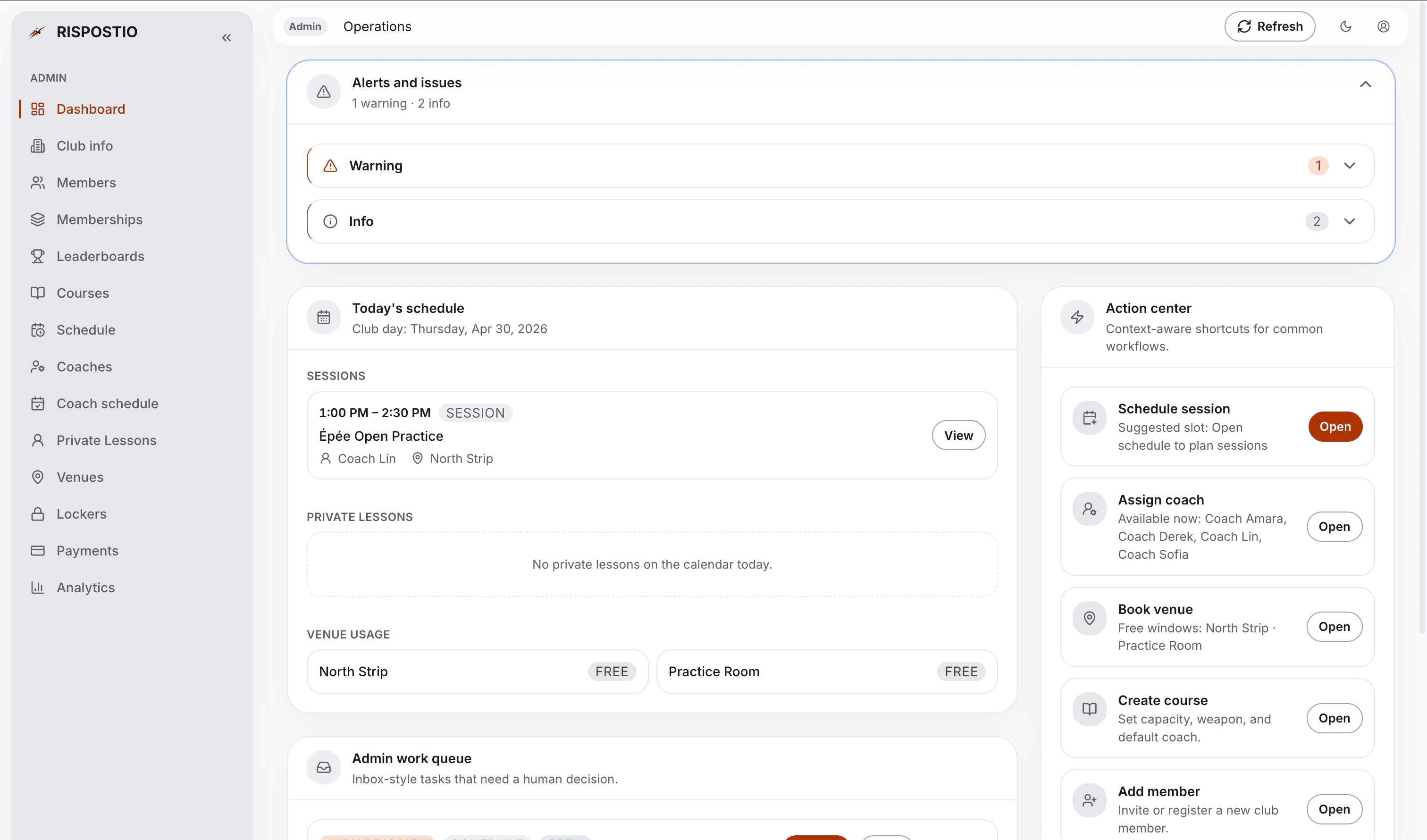
Operations dashboard

Today’s schedule, work queue, live status, alerts, and an onboarding checklist so new clubs launch faster.

Members & memberships

Full roster management, member profiles, tier configuration, invites, and a members leaderboard.

Courses & unified schedule

Course CRUD, session lists, attendance panels, and one calendar for classes, private lessons, and venue blocks—with live updates.

Coaches & availability

Coach directory, profile pages, and a dedicated view to review availability submissions and blockouts.

Private lessons & venues

Oversee lesson slots, bookings, templates, venue resources, and per-venue scheduling.

Lockers, payments & analytics

Approve locker requests, manage payments and refunds, and explore revenue, attendance, coach, and venue analytics.
COACH PORTAL FEATURES

Teach with clarity

Built for coaches and teaching assistants who need fast access to students, sessions, and availability—without admin clutter.

Coach dashboard

Upcoming course sessions and private lessons, plus a queue of pending student evaluations that need your attention.

Students

Your roster of fencers with session history, progress context, and space for coaching notes.

Schedule & sessions

Unified calendar to create course sessions, open attendance, and jump straight into lesson details.

Attendance & QR check-in

Session attendance is the hub—generate QR codes, mark check-ins, and record evaluations from the roster.

Private lessons

Publish lesson supply on a week view, create open slots, and manage individual bookings.

Availability

Set recurring availability, add blockouts, and submit schedule changes for admin review.

MEMBER PORTAL FEATURES

Train & stay connected

The athlete experience—see your club, upcoming activity, progress, and payments without calling the front desk.

Member dashboard

Performance snapshot, upcoming sessions, locker status, pending payments, and shortcuts to key areas.

Club & locker

Club information, contacts, membership context, and locker requests with status tracking.

Schedule & courses

Personal booking timeline plus a browse view of active club courses and course details.

Private lessons

Book tier-eligible lesson slots, view upcoming sessions, and open booking details after you commit.

Progress & leaderboards

Performance trends, session history with scores and attendance, and club-wide competitive rankings.

Payments

Outstanding and completed payments with a dedicated payment history view.

CONNECTED WORKFLOWS

Features that work together across portals

Ripostio isn’t three separate apps—it’s one platform where admin, coach, and member actions stay in sync.

Course check-in

From coach QR to recorded attendance in seconds.

  1. Coach opens session attendance and displays a check-in QR code
  2. Member scans the code or opens the mobile check-in link
  3. Attendance is recorded on the live roster instantly
  4. Coach completes evaluations and scores after the session

Private lesson booking

Coaches supply slots; members book; admins stay in control.

  1. Coach or admin publishes available private-lesson slots
  2. Member selects a slot that matches their membership tier
  3. System validates availability and holds the slot during checkout
  4. Booking commits to the calendar; payment may be created automatically

Locker assignment

Self-service requests with admin approval.

  1. Member submits a locker request from the member portal
  2. Admin reviews the request in the lockers area
  3. Admin approves and assigns an available locker
  4. Member sees updated status on their dashboard and locker page

PRODUCT TOUR

Features in the product

Screens from real Ripostio workflows—operations, rosters, facilities, and performance.

Operations dashboard
ADMIN

Operations dashboard

Your morning command center—see what’s on the strip today before athletes arrive.

  • Today’s schedule and live operational status
  • Action center for quick scheduling and roster tasks
  • Alerts and onboarding guidance for new clubs

FEATURES

Ready to run your club on Ripostio?